Heynote - Wallpaper Notes2.7.1
Publisher Description



Add notes, lists, and images to your home and lock screen wallpapers.
Never forget your notes with Heynote app. Add customizable sticky notes, to-do lists, and images to your stock home screen wallpaper and lock screen wallpaper.
Heynote's way of displaying notes and memos on your wallpapers will get you notified, without the need for any widgets(Heynote adds the reminders directly on the stock wallpaper, which also can be reset at any time).
● Wallpaper Reminders: Add notes, memos, and lists to your home screen wallpaper, lock screen wallpaper, or both wallpapers.
● Sticky Note Customization: Add sticky notes, and customize each of them(position, note color, font color, font family, transparency, ...., etc).
● Background Edit: Change your wallpaper background, or use your own photos.
● Reset Everything: Easily remove the reminders, and reset the wallpapers to their original state at any time.
● Preview Mode: Preview the home screen wallpaper, and the lock screen wallpaper.
● Save and Reuse: Save the wallpapers for later reuse.
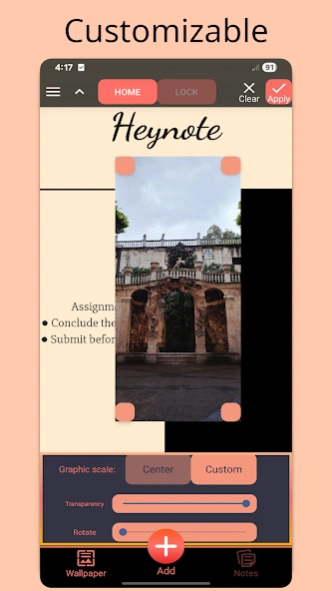
● Add graphics and images to the wallpapers.
● Rotate notes, lists, and images.
● Import custom fonts.
Heynote isn't limited to notes, you can write quotes or anything you want on your wallpapers. So, don't waste your wallpaper, and use Heynote app.
Heynote doesn't require any other app.
By using Heynote you won't forget anything because you'll automatically see your notes every time you open your phone, or simply, you'll have nice writings or quotes on your wallpapers, which can be fully customized at any time.
Privacy policy:
https://shafikis.github.io/hn-app/policy.html
If you Uninstalled this app and would like to get rid of remaining notes on wallpaper, simply change the wallpaper and the notes will be gone.
About Heynote - Wallpaper Notes
The company that develops Heynote - Wallpaper Notes is Shfik Ismail. The latest version released by its developer is 2.7.1.
To install Heynote - Wallpaper Notes on your Android device, just click the green Continue To App button above to start the installation process. The app is listed on our website since 2026-09-03 and was downloaded 4 times. We have already checked if the download link is safe, however for your own protection we recommend that you scan the downloaded app with your antivirus. Your antivirus may detect the Heynote - Wallpaper Notes as malware as malware if the download link to com.si.heynote is broken.
How to install Heynote - Wallpaper Notes on your Android device:
- Click on the Continue To App button on our website. This will redirect you to Google Play.
- Once the Heynote - Wallpaper Notes is shown in the Google Play listing of your Android device, you can start its download and installation. Tap on the Install button located below the search bar and to the right of the app icon.
- A pop-up window with the permissions required by Heynote - Wallpaper Notes will be shown. Click on Accept to continue the process.
- Heynote - Wallpaper Notes will be downloaded onto your device, displaying a progress. Once the download completes, the installation will start and you'll get a notification after the installation is finished.
Program Details
System requirements
Download information
Pricing
Version History
version 2.7.1
posted on 2026-09-03
Heynote - Wallpaper Notes app is now totally free, without any ads or in-app purchases.
Added option for automatic applying of notes, lists and images to wallpapers.
Fixed bugs.
Added improvements.
version 2.7
posted on 2026-08-28
Added option for automatic applying of notes, lists and images to wallpapers.
Fixed bugs.
Added improvements.
version 2.6.8
posted on 2026-05-17
Added option to assign text color values of notes and fonts.
Added improvements.
version 2.6.7
posted on 2026-03-22
Added an option to enable/disable random notes color, and automatic font size.
Added improvements.
version 2.6.6
posted on 2026-03-02
Fixed a bug that occurs when adding an existing note.
Improved user interface.
Fixed bugs, Added improvements.
version 2.6.5
posted on 2025-12-07
Added ability to insert custom dividers, points, and texts into the notes.
Added ability to make the note's background transparent.
Improved user interface.
Fixed bugs, Added improvements.
version 2.6
posted on 2025-08-06
Improved user interface.
Fixed bugs, Added improvements.
version 2.5
posted on 2025-01-20
Added auto note color change for new notes.
Improved user interface.
Fixed bugs, Added improvements.
version 2.4.10
posted on 2024-08-16
Added dynamic font size for new notes.
Fixed bugs, Added improvements.
version 2.4.7
posted on 2024-06-03
Fixed bugs, Added improvements.
